PayPal
[paypal_checkout]
Credit / Debit Card Payment
 [sqaureapp_checkout]
International Bank / Wire Transfer
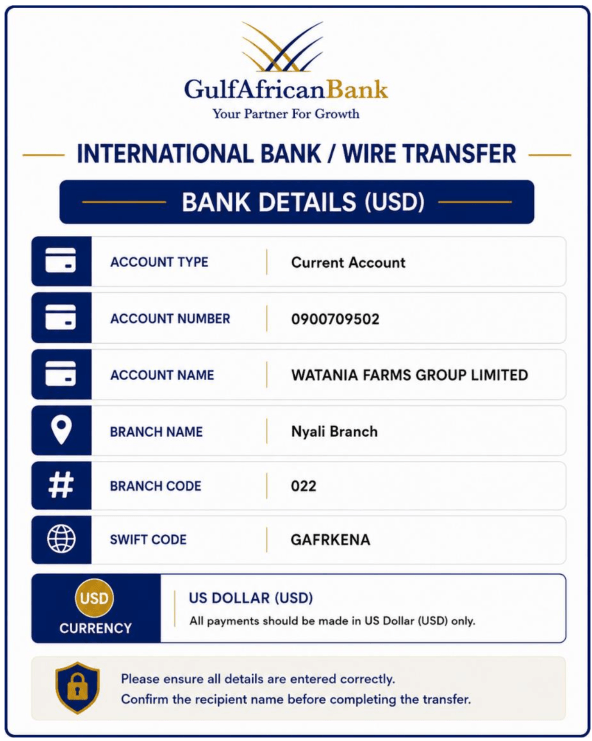
How to Pay via International Bank / Wire Transfer (USD)
- 1 Visit your bank branch, online banking portal, or international transfer service.
- 2 Select International Wire Transfer or SWIFT Transfer.
- 3 Enter the beneficiary bank details as shown on the left.
- 4 Enter the transfer amount in USD.
- 5 Carefully review all beneficiary and banking details.
- 6 Confirm and complete the international transfer.
- 7 Your bank will issue a SWIFT Reference / Transaction Reference Number. Payment confirmation or transfer receipt
- 8 After payment, please complete the payment confirmation form by providing: : Order Number, SWIFT / Transaction Reference Number
- 9 Alternatively, you may paste the full transfer confirmation message or upload the transfer receipt in the form for verification and processing.
*Google Form Payment Confirmation*
Local Bank / Wire Transfer
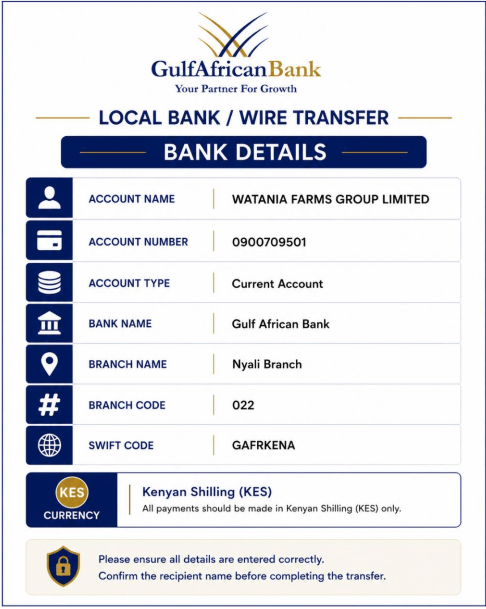
How to Pay via Local Bank / Wire Transfer
- 1 Visit your bank branch, mobile banking app, or online banking portal.
- 2 Select Bank Transfer / Wire Transfer.
- 3 Enter the beneficiary bank details as shown on the left.
- 4 Enter the transfer amount.
- 5 Review all payment details carefully.
- 6 Confirm and complete the transfer.
- 7 You will receive a payment confirmation or transaction reference from your bank.
- 8 After payment, please complete the payment confirmation form by providing: Order Number, Bank Transaction Reference / Confirmation Number.
- 9 Alternatively, you may paste the full bank transfer confirmation message or receipt details into the form for verification and processing.
*Google Form Payment Confirmation*
Lipa na M-PESA
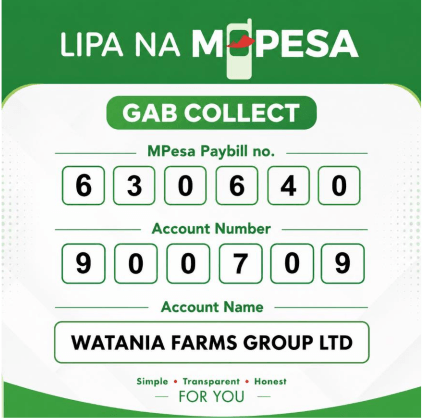
How to Pay via Lipa na M-PESA using GAB Collect
- 1 Open M-PESA on your phone.
- 2 Select Lipa na M-PESA.
- 3 Select Pay Bill.
- 4 Enter Business Number: 630640.
- 5 Enter Account Number: 900709.
- 6 Enter the amount you wish to pay.
- 7 Enter your M-PESA PIN.
- 8 Confirm the payment details: Account Name: WATANIA FARMS GROUP LTD.
- 9 Press OK / Send to complete the transaction.
- 10 You will receive an SMS confirmation from M-PESA containing your: Transaction ID and Payment details.
- 11 After payment, complete the payment confirmation form by providing: Order Number, M-PESA Transaction ID.
Alternatively, paste the full M-PESA SMS confirmation message into the form, and the system will automatically use the payment details for verification and processing.
*Google Form Payment Confirmation*
*Google Form Payment Confirmation*
Payment Confirmation Form
After completing your bank transfer or M-PESA payment, please fill in this form to confirm your payment. Provide your Order Number and transaction reference so our team can verify and process your order promptly.